Cyber Monday Sales Event:

Shipping and processing may be delayed due to high volume.


Black Friday Mega Sale Day ends in
00 Days
:
00 Hours
:
00 Minutes
:
00 Seconds
Customer service icon

Questions? Issues?

We're Here for You!

Mon - Fri, 8am-4pm

manufacturer Xhorse
make Universal
oem part number XKDS00EN
frequency 315Mhz
number of buttons 4
battery size CR2032 Not Included

Description

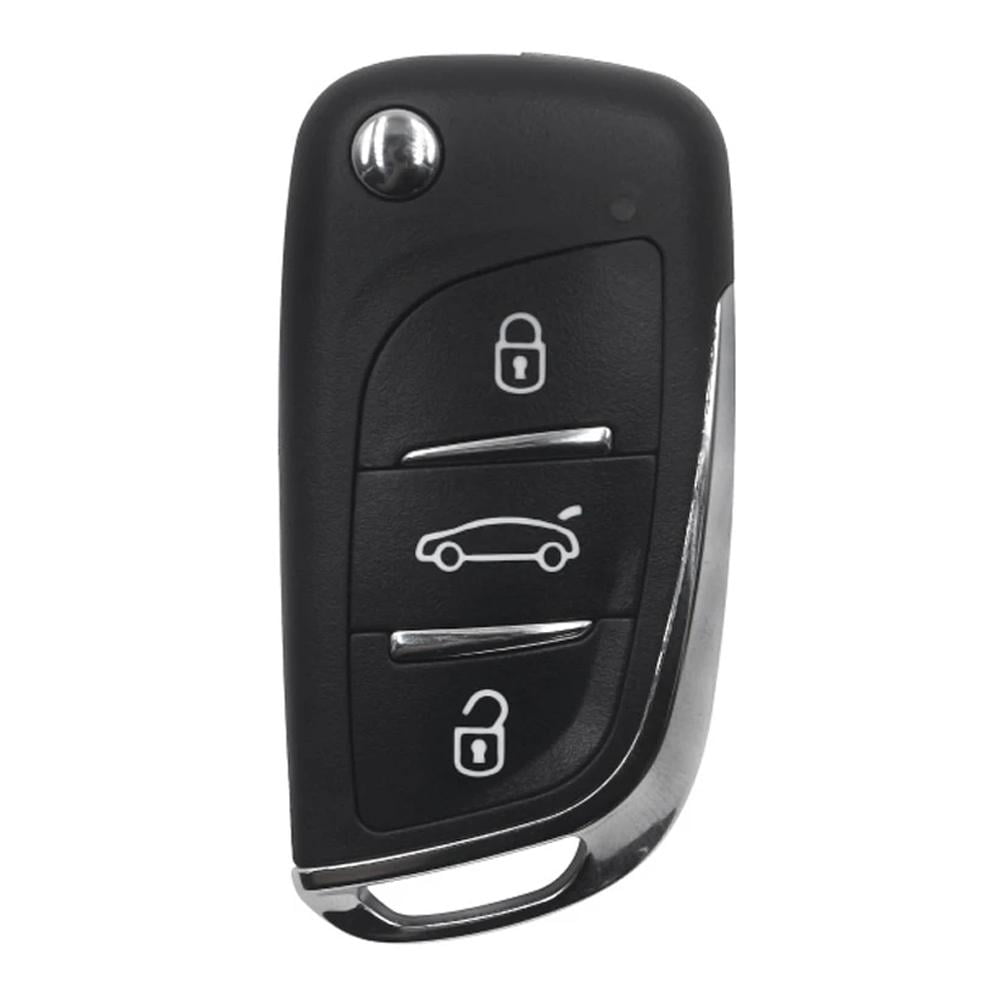
3-Button Toyota Type Remote: Lock, Unlock, Trunk

Instructions for Use:

  1. Open remote and remove battery
  2. Connect data cable to white connector on remote PCB board and plug into VVDI Key Tool
  3. Using the VVDI Key Tool, select Product Remote and select the remote you would like to generate
  4. Disconnect cable, reinsert battery, and reassemble remote. Install proper chip and blade for your application.
  5. Program remove to vehicle as you would an OEM remote

PLEASE NOTE THAT THESE REMOTES DO NOT COME WITH BATTERIES INCLUDED. YOU WILL NEED TO HAVE THE CR2032 BATTERY READY TO INSTALL YOURSELF.

Note: You may encounter issues programming newer batches of Xhorse remotes if you’re using the original VVDI Key Tool. Xhorse no longer supports the original Key Tool, and your machine might falsely identify your remote as being region restricted. If you have a Key Tool Mini or Max and you’re experiencing region lock errors, please submit your machine serial number to Xhorse via the Xhorse app and ask for the region lock to be lifted. Takes about 24 hours. Please speak to your sales rep about upgrading to the Key Tool Mini or Key Tool Max if you’re still using the original machine.

Weight 0.125 lbs
Dimensions 2.75 × 1 × 0.5 in

Reviews

There are no reviews yet.

Be the first to review “XHORSE UNIVERSAL 3B WIRED REMOTE HEAD KEY FOR VVDI TOYOTA XKDS00EN”

XHORSE UNIVERSAL 3B WIRED REMOTE HEAD KEY FOR VVDI TOYOTA XKDS00EN

SKU: 11200N

$12.00

Customer service icon

Questions? Issues?

We're Here for You!

Mon - Fri, 8am-4pm

15 available

Select Deal
Claim Your Savings Instantly!
You save! 5%
Buy 3 – 5 $11.40 /each
You save! 7%
Buy 6 – 9 $11.16 /each
You save! 10%
Buy 10 + $10.80 /each

Frequently Bought Together:

CR2032

manufacturer Xhorse
make Universal
oem part number XKDS00EN
frequency 315Mhz
number of buttons 4
battery size CR2032 Not Included

Description

3-Button Toyota Type Remote: Lock, Unlock, Trunk

Instructions for Use:

  1. Open remote and remove battery
  2. Connect data cable to white connector on remote PCB board and plug into VVDI Key Tool
  3. Using the VVDI Key Tool, select Product Remote and select the remote you would like to generate
  4. Disconnect cable, reinsert battery, and reassemble remote. Install proper chip and blade for your application.
  5. Program remove to vehicle as you would an OEM remote

PLEASE NOTE THAT THESE REMOTES DO NOT COME WITH BATTERIES INCLUDED. YOU WILL NEED TO HAVE THE CR2032 BATTERY READY TO INSTALL YOURSELF.

Note: You may encounter issues programming newer batches of Xhorse remotes if you’re using the original VVDI Key Tool. Xhorse no longer supports the original Key Tool, and your machine might falsely identify your remote as being region restricted. If you have a Key Tool Mini or Max and you’re experiencing region lock errors, please submit your machine serial number to Xhorse via the Xhorse app and ask for the region lock to be lifted. Takes about 24 hours. Please speak to your sales rep about upgrading to the Key Tool Mini or Key Tool Max if you’re still using the original machine.

Weight 0.125 lbs
Dimensions 2.75 × 1 × 0.5 in

Reviews

There are no reviews yet.

Be the first to review “XHORSE UNIVERSAL 3B WIRED REMOTE HEAD KEY FOR VVDI TOYOTA XKDS00EN”